Real-Time
Order Status For
Customers.
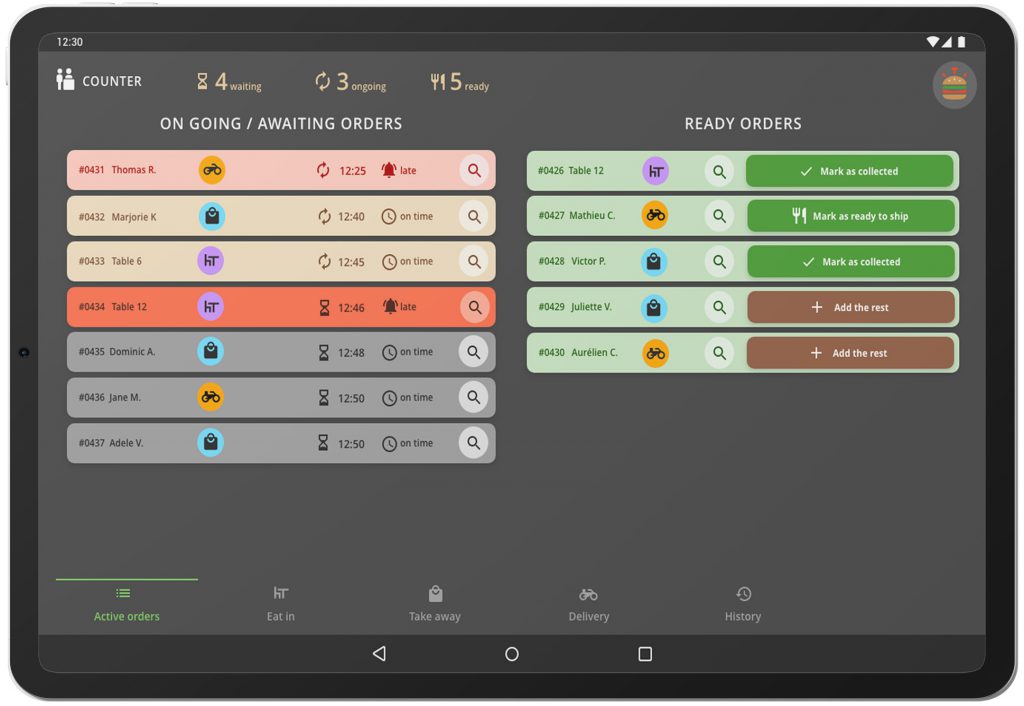
Show customers the live status of their orders on a TV screen. When orders are placed through POS, they instantly appear on the Order Status Display with updates like Preparing and Ready for Pickup.
Live Orders
Order Number
Kitchen Order
Order Number
Kitchen Order
Order Number
Kitchen Order
Live Order Status Display
For Restaurant Customers
Our Order Status Display (OSD) shows customers the real-time status of their orders on a large screen or Android TV. When an order is placed through POS, it automatically appears on the display with statuses like Preparing and Ready, helping customers know exactly when their order is ready for pickup.
Real-Time Orders.
Zero Customer Confusion.
Our Order Status Display keeps customers informed by showing live order progress directly on TV screens — from preparing to ready for pickup.
Live Order Display
Show real-time order status on TV or LED screens.
- Live order status on TV
- Preparing & Ready sections
- Highlighted ready orders
- Auto refresh display
Kitchen Status Sync
Instantly reflect kitchen updates on the display.
- Preparing status updates
- Kitchen ready triggers
- Auto move to ready column
- Kitchen order workflow
POS Integration
Orders flow directly from POS to the display.
- Auto display new orders
- POS order sync
- Takeaway & dine-in orders
- Multi-terminal POS support
Real-Time Tracking
Track orders from placement to pickup.
- Live preparing status
- Ready for pickup alerts
- Completed order logs
- Kitchen progress monitoring
Customer Notifications
Notify customers when their order is ready.
- WhatsApp order alerts
- SMS ready notifications
- Pickup reminders
- Customer feedback links
Pickup Counter Logic
Organize order pickup across multiple counters.
- Multiple pickup counters
- Counter-specific orders
- Fast pickup management
- Order verification at pickup
Smart Alerts
Visual and audio alerts when orders are ready.
- Audio call for ready orders
- Blinking ready notifications
- Display highlight effect
- Custom alert sounds
Order Verification
Ensure the right customer receives the right order.
- Order number validation
- Pickup confirmation
- Digital order history
- Secure pickup process
Why Switch to Smart OSD?
35%
Wait Reduction
100%
Accuracy
Live Order Status Display
Customers can instantly see their order number and preparation status on a digital screen without asking staff.
Real-Time Kitchen Sync
Orders automatically update on the display when the kitchen starts preparing or marks them as ready for pickup.
Faster Order Pickup
Customers immediately know when their order is ready, helping reduce counter crowd and improving service flow.
Modern Restaurant Experience
Digital order display screens create a modern and professional environment for customers in restaurants.
Order Insights & Performance Analytics
Track order volume, preparation time, and peak hours with real-time analytics from your restaurant dashboard.
How it Works.
A simple real-time process that keeps customers informed about their order status.
Order Placed
Customer places an order at the counter or through POS.
Kitchen Processing
Order is instantly sent to the kitchen for preparation.
Preparing
The order status updates to 'Preparing' while the kitchen works.
Live Screen Update
Order number appears on the OSD screen with live status.
Order Ready
When ready, the screen shows 'Ready for Pickup' for customers.
Order Data &Insights.
The Order Status Display system provides real-time analytics on order preparation, pickup flow, and restaurant service efficiency to help you optimize operations.
Total Orders Displayed
Track the total number of orders displayed on the Order Status screen throughout the day.
Average Preparation Time
Measure how long orders take to move from preparing to ready status on the display.
Ready vs Preparing Orders
Monitor the number of orders currently being prepared and those ready for customer pickup.
Peak Order Hours
Identify the busiest hours when the most orders appear on the display screen.
Pickup Completion Rate
Analyze how quickly customers collect their orders after they appear as ready on the screen.
Trusted by Restaurant
Owners & Managers
Real results from restaurants using our smart Order Status Display.
“Before installing the Order Status Display, customers constantly asked our staff about order updates. Now they can simply check the screen to see if their order is preparing or ready, which keeps the counter area organized and improves the pickup experience.”
Rahul Verma
Owner, Express Dine Hub
“Our kitchen and service team now work much more efficiently. As soon as an order is ready, it appears on the display automatically. Customers know exactly when to collect their food without creating crowd near the counter.”
Sneha Malhotra
Restaurant Manager, Urban Tandoor
“The Order Status Display connected with our POS has completely transformed our order flow. Preparing and ready statuses update instantly, helping us serve more customers during peak hours without confusion.”
Arjun Kapoor
Founder, QuickBite QSR
Frequently Asked Questions?
Everything about real-time order status updates, customer display screens, pickup management, and seamless POS integration.
What is an Order Status Display (OSD) system?
Order Status Display (OSD) is a digital screen used in restaurants to show real-time order progress to customers. It displays order numbers and their status such as preparing or ready, helping customers easily track their orders without asking staff.
How does the Order Status Display work with the POS system?
When an order is placed in the POS system, it is automatically sent to the Order Status Display. As the kitchen updates the order status, the display screen instantly shows the updated stage like preparing or ready for pickup.
Where is the Order Status Display usually installed?
The Order Status Display is typically installed on a TV or digital screen in the customer waiting area. It can run on Android TV or connected displays so customers can easily view their order status.
Can the Order Status Display handle multiple orders at once?
Yes. The system is designed to display multiple orders simultaneously. It automatically organizes orders into sections like preparing and ready, ensuring customers can quickly identify their order number.
Does the Order Status Display help reduce crowding at the counter?
Yes. By clearly showing order progress on the screen, customers no longer need to repeatedly ask staff about their order. This reduces counter crowding and improves the overall customer experience.
Is the Order Status Display suitable for QSRs and food courts?
Absolutely. The system is ideal for quick service restaurants, food courts, cafes, and high-volume outlets where many orders are processed quickly. It helps maintain smooth order pickup even during peak hours.
Request
Growth Access
Secure System Node // Connectivity Verified
STABLE